Top 5 compared
The best mesh Wi-Fi systems
Strong Wi-Fi upstairs, in the kitchen and in the office over the garage, with no dead spots left in the house.
36 checked · 5 made the cut
As an Amazon Associate we earn from qualifying purchases. It costs you nothing extra. How this works
The top 5 at a glance





A mesh system swaps one router’s signal for several units spread around the house, all sharing one network name, so phones and laptops move to the nearest unit as you go from room to room. It suits homes with weak spots everywhere: thick walls, long layouts, three floors. Each system here replaces the router from your internet provider, though most cable and DSL plans still need their modem.
Wi-Fi 5, 6, 6E and 7 are the generations: newer devices get the most from the later ones, and older devices still connect. Coverage is each maker’s figure for the whole pack, cut down by walls and floors. All five set up in an app on iPhone or Android and work with Alexa, though none lists Google Home or Apple Home. TP-Link and eero subscriptions are optional: the Wi-Fi works without them.
What matters
- An Ethernet port on every unit, for a TV, console or desktop.
- 2.5-gigabit ports, if your internet plan is faster than a gigabit.
- Wired backhaul, for linking units by cable where there’s a jack.
- Units that work with the maker’s other models, for adding more later.

#1TP-Link Deco X55 AX3000 Wi-Fi 6 Mesh System (3-pack)
$100–$150
- Three Ethernet ports per unit
- Units can link by cable
- Free parental controls and security
Wi-Fi 6 across three identical units, which TP-Link rates for up to 6,500 sq ft and 150 devices. Any unit can act as the router, and a cable between units, where a room has a network jack, frees up more speed for the Wi-Fi. Owners rate the Deco S4 more highly, so it scores higher, but it runs on Wi-Fi 5, a generation older. If the older standard is fine for you, it may suit you better.
What owners say: Setup is quick, owners report, and speeds hold up from room to room, with the signal carrying well into the yard. Price and reliability both get mixed verdicts, and some had a unit give out after three months.
A closer look: Setup runs through the Deco app: one unit connects to the modem with the cable in the box, and the other two go roughly halfway to the rooms where the signal fades. TP-Link pitches it at internet plans up to a gigabit; for anything faster, the eero 7 is the step up.
Best for: Plugging in wired devices
- Wi-Fi standard
- Wi-Fi 6
- Speed class
- AX3000
- Ethernet ports per unit
- 3 x gigabit
- Wired backhaul
- Yes
- Works with the maker’s other units
- Any Deco
- Coverage (maker’s figure)
- Up to 6,500 sq ft
- Smart home
- Alexa
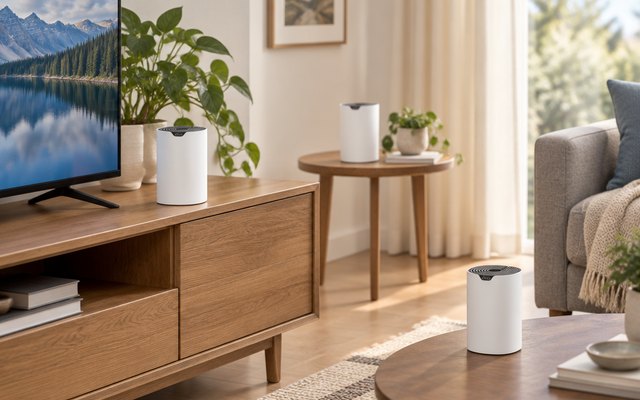
#2TP-Link Deco S4 AC1900 Mesh Wi-Fi System (3-pack)
$75–$100
- Gigabit ports on every unit
- Works with other Deco units
- Free parental controls in app
- Wi-Fi 5, not Wi-Fi 6
Three Wi-Fi 5 units at a lower price than the Deco X55, rated for up to 5,500 sq ft, with parental controls in the Deco app and Alexa voice control for the guest network.
What owners say: Owners describe a strong, steady signal through the house, one covering 5,000 sq ft, and call setup simple. Some see the connection drop now and then, and a few units died after several months.
A closer look: Every Deco model works with every other, so a newer Deco unit can join the network later wherever a room needs more speed. TP-Link puts the pack at up to 100 devices against 150 for the Deco X55, so a busy household on a gigabit plan gets more from the Wi-Fi 6 systems here.
Best for: Cost friendly
- Wi-Fi standard
- Wi-Fi 5
- Speed class
- AC1900
- Ethernet ports per unit
- 2–3 x gigabit (by version)
- Wired backhaul
- Yes
- Works with the maker’s other units
- Any Deco
- Coverage (maker’s figure)
- Up to 5,500 sq ft
- Smart home
- Alexa (guest Wi-Fi by voice)

#3TP-Link Deco XE75 AXE5400 Tri-Band Wi-Fi 6E Mesh System (3-pack)
$200–$300
- Tri-band Wi-Fi 6E
- Rated for 7,200 sq ft
- Handles up to 200 devices
A third band, at 6GHz, carries traffic between the units by default, leaving the other two free for phones and laptops, and TP-Link rates the 3-pack for up to 7,200 sq ft, the most here. Each unit has three gigabit ports.
What owners say: Owners keep coming back to its reach through big houses, one saying it covers half a city block, and to the easy setup. Reliability and dropped connections get mixed reports, and opinions on value differ.
A closer look: Out of the box the 6GHz band links the units to each other; switch it to a network in the app and Wi-Fi 6E phones and laptops can join it directly. Everything older connects on the other two bands, so nothing in the house is left out.
Best for: Large homes
- Wi-Fi standard
- Wi-Fi 6E
- Speed class
- AXE5400
- Ethernet ports per unit
- 3 x gigabit
- Wired backhaul
- Yes
- Works with the maker’s other units
- Any Deco
- Coverage (maker’s figure)
- Up to 7,200 sq ft
- Smart home
- Alexa (guest Wi-Fi by voice)
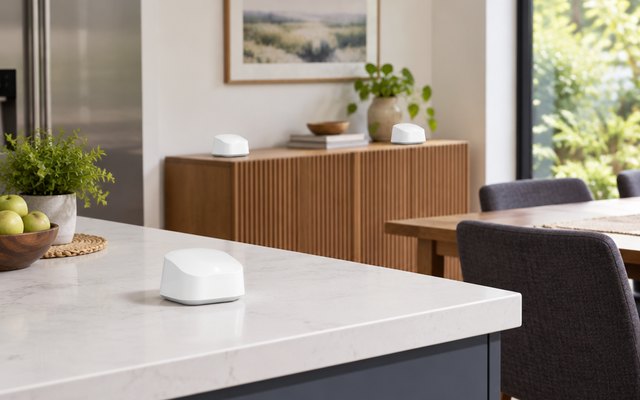
#4Amazon eero 6+ Mesh Wi-Fi System (3-pack)
$200–$300
- Smart home hub built in
- Units 3.9 in across
- Works with older eero units
- Rated for only 75-plus devices
- Covers only 4,500 sq ft
eero, a San Francisco mesh Wi-Fi start-up, has been part of Amazon since 2019, and the eero 6+ doubles as a smart home hub for Zigbee and Thread devices with Alexa. Three identical Wi-Fi 6 units with 160 MHz channels handle plans up to a gigabit.
What owners say: One owner has 4,000 sq ft covered with no dead spots, and setup takes minutes for most. Connections drop for some while others call them rock-solid, and a few doubt it justifies the cost.
A closer look: Each unit is about 3.9 in across, small enough for a bookshelf or the spot beside the TV. eero Plus, the optional subscription for extra security and network controls, comes with a 30-day free trial for new eero customers, so its extras can be tried before paying.
Best for: Small units
- Wi-Fi standard
- Wi-Fi 6
- Speed class
- AX3000
- Ethernet ports per unit
- 2 x gigabit
- Wired backhaul
- Yes
- Works with the maker’s other units
- Earlier eeros and the eero 7
- Coverage (maker’s figure)
- Up to 4,500 sq ft
- Smart home
- Alexa, with a Zigbee and Thread hub

#5Amazon eero 7 Wi-Fi 7 Mesh System (3-pack)
Over $300
- 2.5-gigabit Ethernet ports
- Wi-Fi 7 with multi-link
- Three-year warranty
Two 2.5-gigabit ports on every unit handle internet plans up to 2.5 Gbps, and Wi-Fi 7’s multi-link operation lets newer phones and laptops use both bands at once. Three units cover up to 6,000 sq ft and more than 120 devices, with a three-year warranty.
What owners say: Owners had it running in about 15 minutes and praise the speed and reach, plus how simply the app manages devices. Some run into connection problems, and a few work laptops don’t get along with it.
A closer look: The 2.5-gigabit ports pay off on internet plans faster than a gigabit, or for a desktop or network storage wired to one of the units. It works alongside older eero units, so an existing eero network can grow with it rather than be replaced.
Best for: Fastest internet plans
- Wi-Fi standard
- Wi-Fi 7
- Speed class
- BE5000
- Ethernet ports per unit
- 2 x 2.5-gigabit
- Wired backhaul
- Yes
- Works with the maker’s other units
- All earlier eeros
- Coverage (maker’s figure)
- Up to 6,000 sq ft
- Smart home
- Alexa, with a Zigbee, Thread and Matter hub
Side by side
How they compare
Swipe sideways or rotate device to see all 5.
| Feature | #1Deco X55 | #2Deco S4 | #3Deco XE75 | #4eero 6+ | #5eero 7 |
|---|---|---|---|---|---|
| Best overall | Best budget | ||||
| Picked Rating | 8.7 | 8.8 | 8.6 | 8.6 | 8.6 |
| Price | $100–$150 | $75–$100 | $200–$300 | $200–$300 | Over $300 |
| Wi-Fi standard | Wi-Fi 6 | Wi-Fi 5 | Wi-Fi 6E | Wi-Fi 6 | Wi-Fi 7 |
| Speed class | AX3000 | AC1900 | AXE5400 | AX3000 | BE5000 |
| Ethernet ports per unit | 3 x gigabit | 2–3 x gigabit (by version) | 3 x gigabit | 2 x gigabit | 2 x 2.5-gigabit |
| Wired backhaul | Yes | Yes | Yes | Yes | Yes |
| Works with the maker’s other units | Any Deco | Any Deco | Any Deco | Earlier eeros and the eero 7 | All earlier eeros |
| Coverage (maker’s figure) | Up to 6,500 sq ft | Up to 5,500 sq ft | Up to 7,200 sq ft | Up to 4,500 sq ft | Up to 6,000 sq ft |
| Smart home | Alexa | Alexa (guest Wi-Fi by voice) | Alexa (guest Wi-Fi by voice) | Alexa, with a Zigbee and Thread hub | Alexa, with a Zigbee, Thread and Matter hub |
| Best for | Plugging in wired devices | Cost friendly | Large homes | Small units | Fastest internet plans |
| Buy now | Amazon | Amazon | Amazon | Amazon | Amazon |
How we checked these
How 36 became 5
We found 36 mesh Wi-Fi system listings. Five were the same system again in a smaller pack, and 19 were rated too low and/or had too few ratings or sales to compete. That left 12, which we narrowed down step by step:
- Ratings, reviews and salesFor the 12, we then checked the ratings and reviews further, and how many people buy each one. Owners talked most about how easy they are to set up, coverage and how steady the connection is, then speed, value for money and how reliable they are. After these checks, we dropped five more.7 left
- Features weighed upThe seven left were compared on the Wi-Fi standard, speed class, Ethernet ports on each unit, linking units by cable, working with the maker’s other units, coverage and smart home features. Once everything was weighed up together, we dropped two more.5 made the cut
- Value for moneyEvery mesh Wi-Fi system here is worth what it costs. A dearer one is only here if it gives you more.
- Who sells itEvery seller was checked. Each mesh Wi-Fi system is sold new and shipped from the US.
- Safe to buyEvery brand on this list was checked for safety recalls. None of these five mesh Wi-Fi systems has one.
Spotted a mistake or something out of date? Tell usBack to top


